
Category Archives: Tech/Games

Programming at HPSH

ianHighland offers a wide range of electives. Electives can be used to explore studies outside the core curriculum. Electives offered are anything from sports and journalism, to photography and programming. I am here today to talk about one particular elective: computer science with Mr. Peterson.

Back in my Junior year, I took computer programming as an elective. I liked my experience, as I thought the class was fun but simple, and Mr. Peterson was a great guy. The class taught me how to use Scratch and Google Sketchup, and unlike a lot of other classes, he gave us a lot of creative freedom. Most assignments had an end goal requirement, like “have it multiplayer” or “draw a house,” but anything else was up to us. We could decide what kind of multiplayer game it was, and what the details of the houses were.

Perhaps the reason why I did so well in the class, was because I had experience in programming and model design. As a kid I had always been very creative and loved Legos. Eventually, I turned to video games, but my creativity stayed the same. In games like Minecraft and Garry’s Mod I could explore and interact with my own creations; which is a wonderful, godlike experience.

Then I found LittleBigPlanet, a game that gave a limited range of tools that, if you knew your stuff, could create almost anything. The game is primarily a platformer, but I have seen people create shooters, RPGs, mini games, full length movies, anything and everything you can set your mind to, if you know how to make it.

How the programming in LittleBigPlanet works is a lot like Scratch; how you place and hook up modules to activate things. It is as complex as you make it. If I want to make it so that when the player grabs a button it turns on a light, I place an object called a “grab sensor,” and wire it up to a light.

I can make the same concept more complex too. Like if I want it to be that only certain characters can grab the button, and make the light turn on permanently, I can add a tag sensor and hook that and the grab sensor up to an AND gate, and hook that up to a counter set to 1, so when a certain player with a tag grabs the button, both conditions are met so the AND gate sends out a signal, activating the counter so it is at 1/1 and permanently sends out a signal to the light.

I have used this system to create some pretty complex stuff, like a character stealth system, movement speed of characters, etc.

So, if any of this sounds interesting to you, or if you would like to learn more about programming, you should check out Mr. Peterson’s elective class.
iPad handout

This week was iPad handout week where students got their iPads during their Social Studies class. Since the district is controlling the iPads this year, some things were changed.

If a student wanted their iPad, their parents had to go on Parent Portal and fill out the form (iUpdate) online. Last year, students were given printed forms to sign which made things easier for those who had no access to Internet.

There were a few complaints about going on Parent Portal. One thing, is that people say the form was hard to find. At max, it took them about 10 minutes to find the form. Another complaint was that the access to Parent Portal was sent in the mail to the person’s residence during the summer. The complaint was that some people didn’t keep their mailing, or that the parents didn’t know they were supposed to keep it for future use.

For those students who didn’t get their iPads, there was a mailing sent to everyone about the iPad makeup day. Students would get another chance to get their iPad once their parents filled out the iUpdate form.

This year’s iPad handout went by surprisingly fast. Hopefully, everyone uses their iPads appropriately.

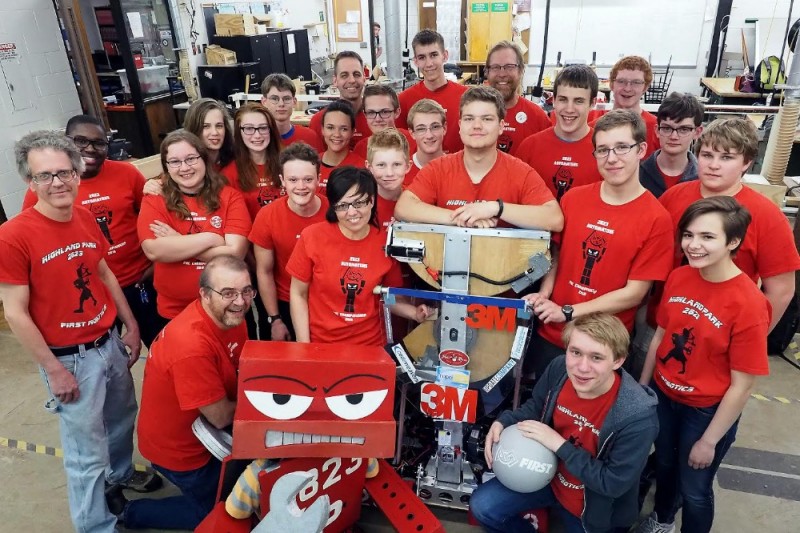
Team 2823: The Automations

Last year our very own Highland Park High robotics team, 2823, made it to the championships in St. Louis, MO. They had many victories and ended up leaving with the title “Most Creative in Minnesota.”

Now it’s a brand new year and the whole team is looking forward to what this new school year brings. I interviewed some of the team members and mentors about what happened last year in St. Louis, what they have been doing this summer, and what is to come for this year on the team.

Photo from Go Fund Me Page

Name/ Grade: 

Moriss: 10th

Qwadir: 11th

Talking About St.Louis

So last year in St.Louis I would say we did a fairly amazing job. How do you think we did and why?

Moriss: We did amazing. They say we were the last team to be undefeated but technically we were undefeated in my opinion.

Qwadir: We attended the FIRST Championships and it was actually pretty spontaneous and ended up going undefeated in qualifications.

What was the best part of being in St. Louis with some of the team for the championships?

Moriss: Interacting with the other teams.

Qwadir: How well we did and how unexpected it was for us to do that well.

Summer!!

What has the team been doing over the summer to raise awareness about the team or robotics in general?

Qwadir: The biggest thing, first off, the better organization. Getting more structured and organized. We have also been attending the Highland Fest and the State Fair.

Whats to expect this year on team 2823

What do you think is to come this year for robotics?

Moriss: I have higher hopes for Duluth (where the State Championship is held) and robotics in general

Qwadir: Steampunk industral aged theme game. From the team a great preformence and going to champs again.

Do we see Duluth as another possibility this year?

Moriss: Yes, I do.

Qwadir: For sure. We are definitely going to Duluth again. We are already securing the funds.

What would you say to someone thinking about joining the team?

Moriss: You should join because we have a lot of opportunities to learn new skills and build more friendships.

Qwadir: Definitly, just come and see what it’s about. We are here every Thursday in the fall. There are a lot of things to do besides just build the robot.

The Go Fund Me Page

Our robotics team has a Go Fund Me page. Definitely go check it out. It supports the team a lot and also gives the team more opportunities for competition and building. The team goal is $10k. The goal of the team is to develop and apply the knowledge of science, math, business, teach leadership, and problem solving. More info can be found on the Go Fund Me page: https://www.gofundme.com/txf7z5qc


iPad tips

heroNow that the entire student population of HPHS has an iPad in their own possession, there are some tips I’d like to highlight about the devices. Here are the top 5 things to know about SPPS iPads:

5) Use it as much as possible. Remember that whenever the red sign isn’t displayed in the classroom, your iPad can be out and in use. It has the capability to replace most of your paper, don’t let the simplicity of a notebook hold you back.

4) Note-taking. Evernote, Bamboo Paper, Pages, Google Docs and Notes all make for an easy and simple lecture. Just turn the iPad where it’s easiest for you to type and then go to town.

3) AirDrop. Use it as a tool, not a distraction. It can easily help you accomplish tasks. If you missed a day of class, have a friend drop you the notes or a teacher AirDrop the assignment that you missed.

2) “They’re watching you….” Teachers can use Casper Focus to see what you are doing, lock your iPad or lock you into a specific app of their choosing. Through Mobile Device Management, the district, with probable cause, can view you browser/download history and where you have been connected to a network. They also scan each iPad every 24 hours to see if you have downloaded one of the banned apps found at bit.ly/notapps.

1) iPads are a privilege, not a right. Use them the wrong way and continue to abuse your privileges and consequences will be handed to you about as quickly as your iPad was given to you. Use it as tool and avoid the game section of the App Store.